
Logging In to DK-88: Credentials, Google Sign-In and Password Recovery
Getting back into your account takes the same username and password pair you set up when you first registered with DK88, unless you joined through Google, in which case sign-in works differently. This page walks through the standard sign-in steps, what each credential field actually requires, the Google alternative, and the route to take if a password slips your mind.
Steps to Sign In to DK88
Reaching your dashboard from any page on our site takes only a few taps once your details are on hand. Follow this sequence:
- Open the sign-in form from the top of any page.
- Type in the username you chose during registration.
- Enter your password in the field below it.
- Select the sign-in button to submit the form.
- Once your details match our records, your dashboard loads with your balance, active promotions and bet history visible.
The same sequence applies whether you're returning to place a sports bet, spin a slot, or check a pending withdrawal, since one account covers every product on our platform.
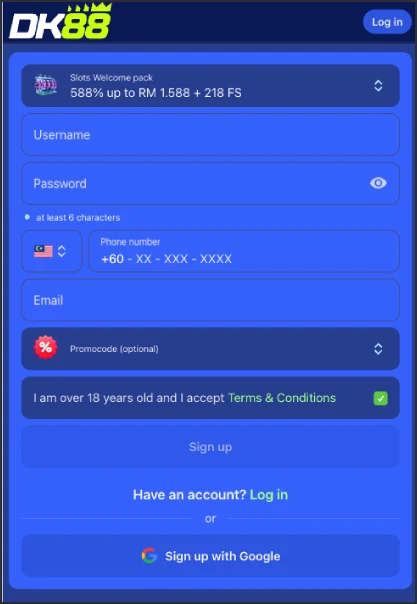
DK88 Login Fields and Requirements
Every credential checked at sign-in traces back to the details entered on our registration form. Knowing what each field requires ahead of time helps you avoid a rejected attempt:
| Field | Requirement |
|---|---|
| Username | Chosen freely at registration; used as the primary identifier at every sign-in |
| Password | Minimum 6 characters, set at registration and case-sensitive at sign-in |
| Phone number | Registered under the fixed +60 Malaysia prefix; not typed at sign-in but tied to identity checks |
| Email address | Registered alongside your phone number; used for communication and account recovery |
Phone and email aren't fields you type on the sign-in screen itself, but keeping both current on your profile matters the moment you need to confirm you're the account owner, whether that's for a support query or a withdrawal check.
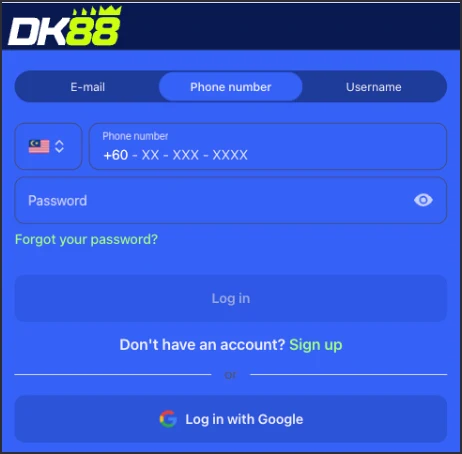
Signing In to DK88 with Google
Registration on DK88 offers a "Sign up with Google" alternative alongside the standard form, and accounts opened that way sign in differently from a typed username and password:
- Select the Google sign-in option on the same screen used for standard sign-in.
- Choose the Google account linked to your DK88 registration.
- Confirm the prompt Google shows you, and you land on your dashboard without ever typing a password.
Because no separate DK88 password exists on a Google-linked account, recovering access in this case means regaining access to that Google account rather than resetting anything through us directly.
DK88 Password Recovery
A publicly documented, self-service password-reset flow isn't currently published on our site, so a forgotten password calls for a different route than a "forgot password" link:
- Contact our support team through live chat or email instead of looking for a reset link on the sign-in screen.
- Have details tied to your account ready, such as your registered phone number or email, so our team can confirm you're the account holder.
- Follow the instructions support gives you to regain access once your identity is confirmed.
This route applies to standard username-and-password accounts specifically. If you originally joined DK88 through Google, recovery runs through your Google account instead, as covered above.
Common DK88 Login Problems
Most sign-in trouble traces back to one of a small number of causes:
- Username or password typo — both fields are case-sensitive, so one mismatched character is enough to block sign-in.
- Wrong sign-in method selected — trying the standard form after registering through Google, or the reverse, won't authenticate.
- Incomplete profile details — this doesn't block sign-in itself, but a withdrawal request needs your legal name, date of birth and location confirmed first.
- Account flagged under the one-account rule — covered in full just below, this can restrict access where multiple accounts are suspected.
If sign-in succeeds but certain features look restricted, finishing your profile is usually the fix, not a sign that your credentials themselves are wrong.
DK88's One-Account Rule
Our Terms and Conditions (§3.7) hold every player to a single DK88 account. Where we identify multiple accounts, including ones opened with someone else's personal details, coordinated groups of accounts, fraudulent transactions or chargebacks, or collusion between users, we may void the wagering contract tied to those accounts, which can carry over into restricted sign-in access.
Keeping one account under your own accurate details, rather than opening a second one, is the safest way to keep your DK88 sign-in, bonus progress and VIP standing intact.
DK88 Login FAQ
What do I need to log in to DK88?
Your registered username and password. If you signed up through Google, use that linked account instead of a typed password.
Can I sign in to DK88 with Google?
Yes, but only if you originally registered using the "Sign up with Google" option. Standard accounts sign in with a typed username and password.
I forgot my DK88 password. What now?
Contact support through live chat or email, since a self-service reset flow isn't published on the site. Have your registered phone number or email ready to confirm your identity.
Can I have more than one DK88 account?
No. Multiple accounts, including ones opened with someone else's details, can void your wagering contract under our Terms (§3.7) and affect your ability to sign in.